One place for your proxy setup
Avalon is a sing-box client for managing the configurations and proxy servers you already have. It brings subscriptions, individual nodes, proxy chains, routing, and connection information into one application. You supply your own subscription or server details; Avalon does not sell proxy servers or include a network service.
Local features are free. Configurations are stored on your device, where you can open profiles, edit nodes, and manage your saved setup. Downloading subscriptions and connecting to proxy servers use the network.
Subscriptions, files, and individual nodes
Profiles hold the setup you choose to run. Import a subscription URL, load a local file, or scan a QR code on mobile. The V2 import flow recognizes sing-box JSON, Clash YAML, and supported URI lists, including Base64-encoded lists. Import warnings identify content that needs attention instead of treating every source as fully compatible.
A subscription can be refreshed after its provider changes the nodes or rules. If an update fails, Avalon keeps the last successfully downloaded content and displays the failure. Local file imports save a snapshot of the imported content on your device.
For a server you manage yourself, create an individual node. The editor covers Hysteria2, TUIC, VLESS, VMess, Trojan, Shadowsocks, SOCKS5, AnyTLS, and HTTP/HTTPS. Its fields follow the selected protocol, including credentials, transport, and TLS settings where applicable.
Choose how traffic is routed
Avalon offers three outbound modes. The mode decides how traffic handled by the client is routed; system permissions and the platform determine which traffic the client can receive.
- Rule modeUses the profile's routing rules to choose a proxy route or a direct connection for each destination.
- Global modeUses the selected proxy route for traffic handled by Avalon. This is useful when checking a particular node or using a single route.
- Direct modeAccesses destinations directly. A selected node can remain saved for when you switch back to a proxy mode.
Select a node or build a multi-hop path
The proxy page shows the groups defined by the current profile. A manual selection group lets you choose a member. A latency-based group displays the member automatically chosen by the running core.
A proxy chain sends traffic through two or more nodes in sequence. The first node is the entry and the last is the exit. You can reorder the hops and combine supported protocols. A chain depends on every hop: adding another server adds another connection that can be slow or unavailable.
Avalon can test nodes and complete chains. A full-chain result measures the path itself; adding the individual node latencies is only an estimate. Test results belong to the conditions under which they were measured, so refresh them after changing networks or the test destination.
See what is actually happening
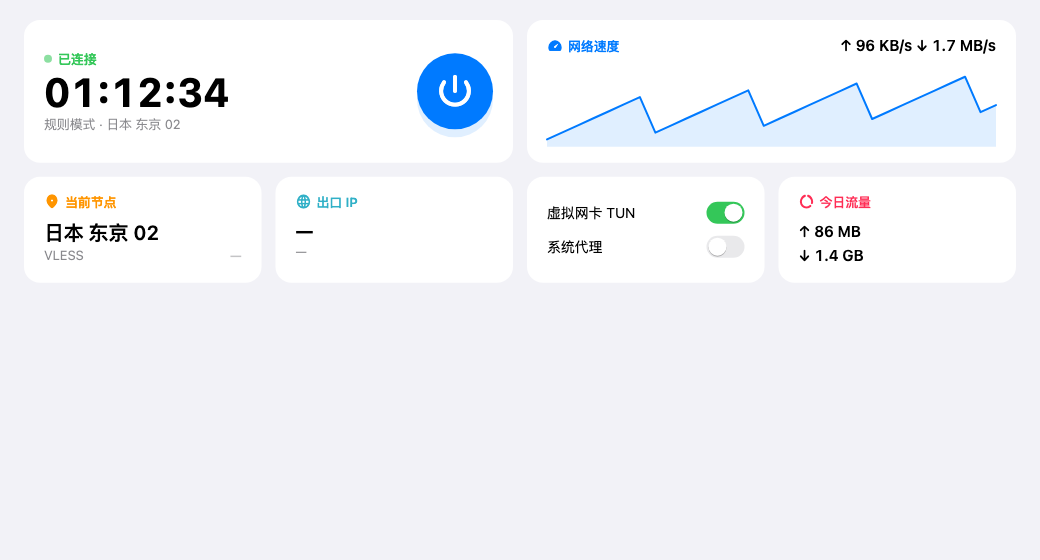
The dashboard brings together connection state, current outbound, traffic speed, transferred data, and exit IP information. Unavailable measurements appear as unknown. Assess the connection using its state, an actual request, and the exit information together.
The connections view helps answer a more specific question: which rule and route did this request use? It shows active destinations, traffic, and the route reported by the core. The logs view adds filtering by severity and a redacted export for troubleshooting. Review exported information before sharing it with someone else.
Keep your setup and back it up
Proxy credentials are encrypted in local storage. You can also create a password-protected .avalonbackup file containing profiles, individual nodes, chains, selections, and settings, including the secrets needed by that setup. Keep the file and its password safe; the password is needed to restore it.
Restoring merges by object identity: backed-up objects replace local objects with the same ID, while local-only objects remain. Settings are replaced by the values in the backup. A restore does not sign into Cloud, restore a Tailscale identity, grant system permissions, or start a connection. This makes a file backup useful for a deliberate move to another device as well as recovery on the same one.
Mobile, desktop, and optional sync
Avalon is designed for Android, iOS, macOS, Windows, and Linux, with English and Simplified Chinese interfaces and light and dark appearances. Available downloads, network permissions, and individual features vary by platform. For example, iOS has no per-app proxy controls; desktop network integration depends on the system's supported permissions and services.
Cloud provides multi-device synchronization when it is available in your build and service. Password-protected file backups are another way to move your setup. Check the release notes for the version you plan to install, including its supported platforms and available features.